Bandwidth-aware load distribution
By default, Raft spreads traffic round-robin over all its carriers. With bandwidth priorities, you tell Raft which carriers you prefer, for example Ethernet over a metered cellular link. Raft then uses the preferred carriers as much as their bandwidth allows, and only moves traffic to the others when they fill up.
How it works
Raft continuously estimates the bandwidth of each carrier, and distributes the traffic by priority:
- The highest priority goes first. If the carriers with the highest priority have room for all the traffic, they carry all of it.
- Overflow goes down the list. As those carriers approach their estimated bandwidth, Raft sends the rest to the carriers with the next priority.
- Equal priorities share. Carriers with the same priority take turns, within their bandwidth estimates.
A higher number means a higher priority.
Enable it
Give every carrier of the Raft component a priority. Either all carriers have one or none do.
-
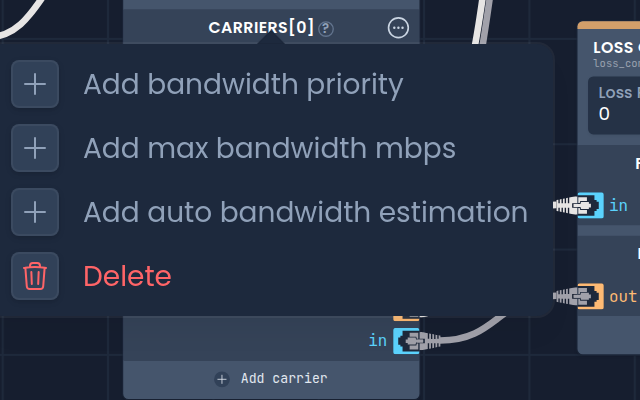
In the diagram, right-click a carrier of the Raft component and choose Add bandwidth priority.
-
Enter the priority, and do the same for the other carriers.
-
Save the pipeline, and set the same up on the Raft component at the other end.
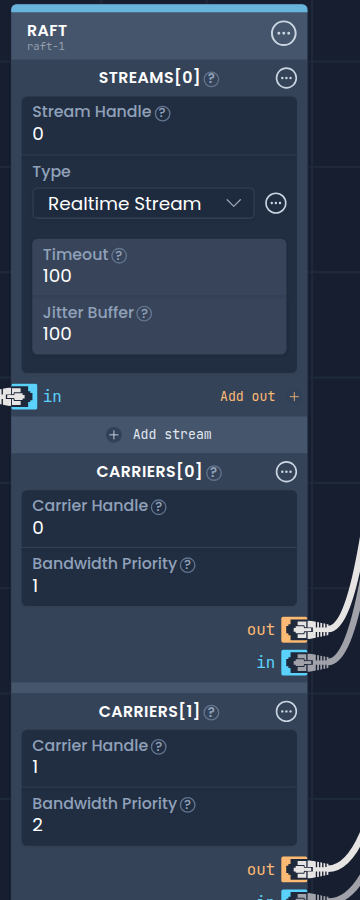
In this example, carrier 1 has the highest priority and carries as much traffic as it can. Carrier 0 takes the overflow:
The same menu has two related settings:
- Add max bandwidth mbps: the most bandwidth, in megabits per second, the carrier may use.
- Add auto bandwidth estimation: set it to off to use the max bandwidth as the carrier's bandwidth estimate, instead of measuring it.
To go back to round-robin, remove the priority from every carrier.
When the traffic does not fit
With priorities set, Raft only accepts the traffic that its carriers can carry. When the traffic exceeds the combined bandwidth, Raft drops the excess packets as they enter the stream.
What that means for the application depends on its protocol:
- With flow control, such as TCP or QUIC, the drops slow the sender down to what the network can carry.
- Without flow control, such as UDP, the application has to adapt itself, for example by lowering the video bitrate.
An application that keeps sending more than the network can carry loses the excess packets.