Hub
The hub facilitates a control plane. The hub is split into two parts: the hub server and the hub client. The hub server is a centralized service that nodes can connect to. The hub client is a service that runs on each node and connects to the hub server.
Hosting a hub server
To host a hub server, you need to enable the hubServer section in the Config file
node:
  name: server
http:
  address: 127.0.0.1:8769

hubServer:
  authenticationByRequest:
    timeout: 5m
A hub server can require connecting nodes to present a client certificate (mutual TLS) and reject any node whose certificate is not signed by a trusted CA. See Mutual TLS (mTLS) in the Config file reference.
Connecting a node to the hub server
On the node you want to connect to the hub server, run:
sudo np authenticate-by-request http://localhost:8769
Replace http://localhost:8769 with the actual HTTP address of the node hosting the hub server.
To approve the authentication request, on the node hosting the hub server run:
sudo np -c /path/to/config.yaml authentication-requests
A list of pending authentication requests will be displayed. Select the client and press ENTER to approve the request.
Connecting a Node to the Hub Server
This process is split into two parts: initiating the request on the Node and approving it on the Hub.
Ensure you have access to both the Node dashboard and the Hub server before proceeding.
Part 1: The Node
On the Node device, follow these steps to send a connection request.
-
Open Settings: Navigate to the Dashboard and click the Settings button on the left-hand sidebar.

-
Initiate Connection: Click the Connect to Hub button.

-
Enter Host Address: Input the host address (IP or URL) of the Hub you want to join.
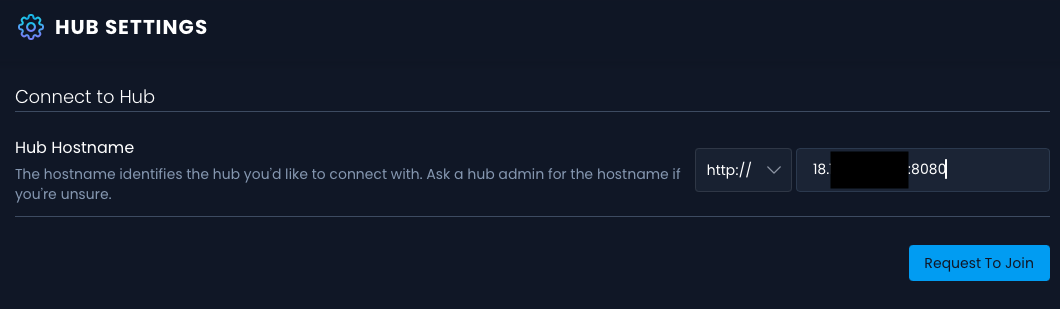
After clicking the request button, you will see a notification on the screen confirming the request was sent:

Part 2: The Hub
Once the request is sent, switch to the Hub interface to finalize the connection.
-
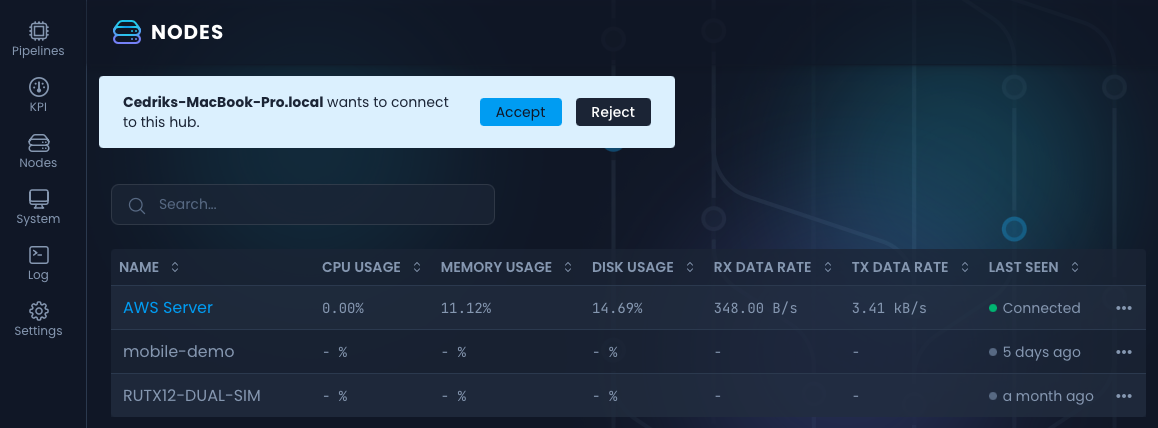
Navigate to Nodes: Click the button on the left-hand side of the dashboard to enter the Nodes section.
-
Locate the Request: You will see a pending request to join the hub in the list.
-
Accept the Node: Click the Accept button.
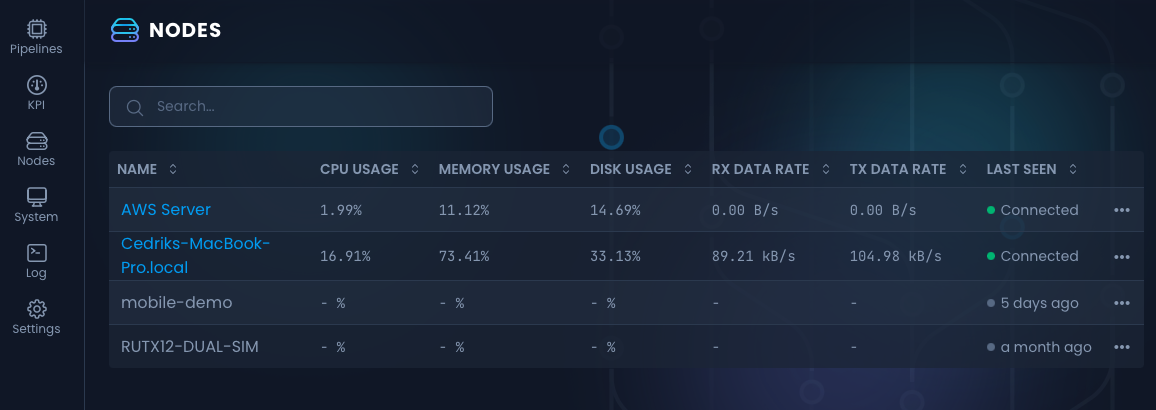
The new node will immediately appear in your Nodes Overview list.
Leaving a hub
A node that leaves a hub is also removed from the hub server's node list, so it stops appearing under Nodes.
From the node dashboard
Navigate to Settings, and under Hub Connection click Leave hub, then confirm.
From the command line
On the node, run:
sudo np disconnect-from-hub
When the hub server cannot be reached
If the hub server does not answer, the node stays connected and the dashboard asks whether you want to leave anyway.
Choosing Leave Anyway disconnects the node, and what happens to its entry on the hub depends on why the removal failed:
- The hub server could not be reached, for example because it is offline or the network is down. NanoPing keeps retrying the removal in the background for up to 7 days, and the retry survives restarts of the node. If the hub server comes back within that window, the node disappears from the node list on its own and there is nothing more to do.
- The hub server answered and refused, for example because it requires a client certificate that the node cannot present, or because it is an older version that predates this feature. Retrying will not help, so a hub administrator has to remove the node manually.
If the node had already been removed from the hub server in the meantime, leaving succeeds quietly: there is nothing left to remove, and you are not asked anything.
np disconnect-from-hub and the gRPC disconnect call have nobody to ask, so they always leave the hub. They report why the node could not be removed, on the console and in the node log respectively, and otherwise behave exactly as above.
Removing a node from the hub server
An administrator can remove any node from the hub, whether or not the node is online.
- Navigate to Nodes.
- Open the ⋯ menu on the node's row and choose Remove.
- Confirm.
The node is disconnected immediately and will not reconnect.
Automatic removal of long-offline nodes
Nodes that can never ask to be removed themselves, such as a wiped or decommissioned machine, would otherwise stay in the node list forever. The hub server therefore removes nodes that have been offline for longer than hubServer.pruneOfflineNodesAfter, which defaults to 30 days. See Pruning offline nodes in the Config file reference.